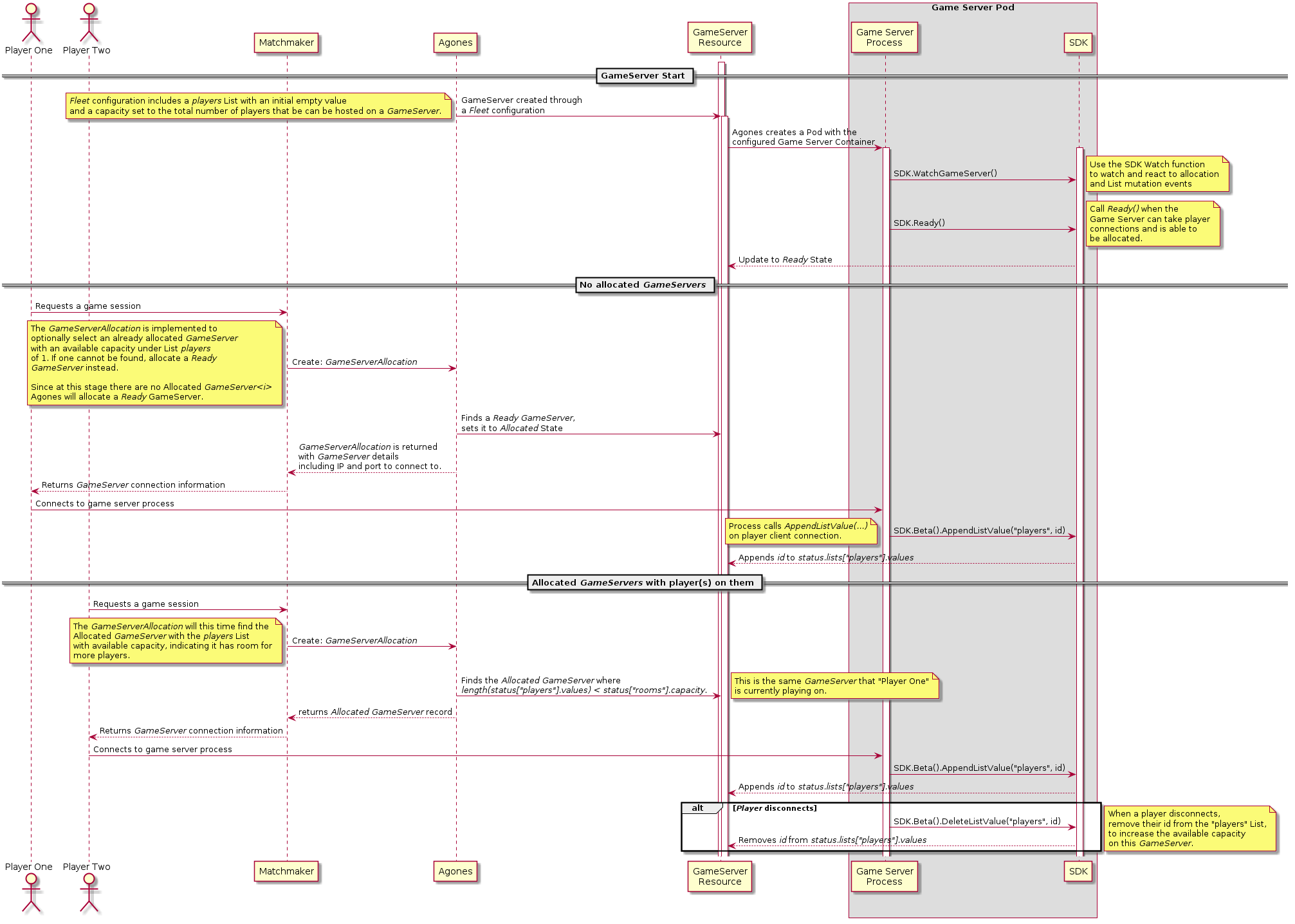
The Counters And Lists feature is currently Beta, and while it is enabled by default it may change in the future.
Use the Feature Gate CountsAndLists to disable this feature.
See the Feature Gate documentation for details on how to disable features.
### Example `GameServerAllocation`
The below allocation will attempt to find an already Allocated `GameServer` from the `Fleet` "simple-game-server" with
room for at least 10, and if it cannot find one, will allocate a Ready one from the same `Fleet`.
```yaml
apiVersion: allocation.agones.dev/v1
kind: GameServerAllocation
spec:
selectors:
- matchLabels:
agones.dev/fleet: simple-game-server
gameServerState: Allocated # check for Allocated first
lists:
players:
minAvailable: 10 # at least 10 players in available capacity
- matchLabels:
agones.dev/fleet: simple-game-server
lists:
players:
minAvailable: 10 # not required, since our GameServers start with empty lists, but a good practice
```
## Player Tracking
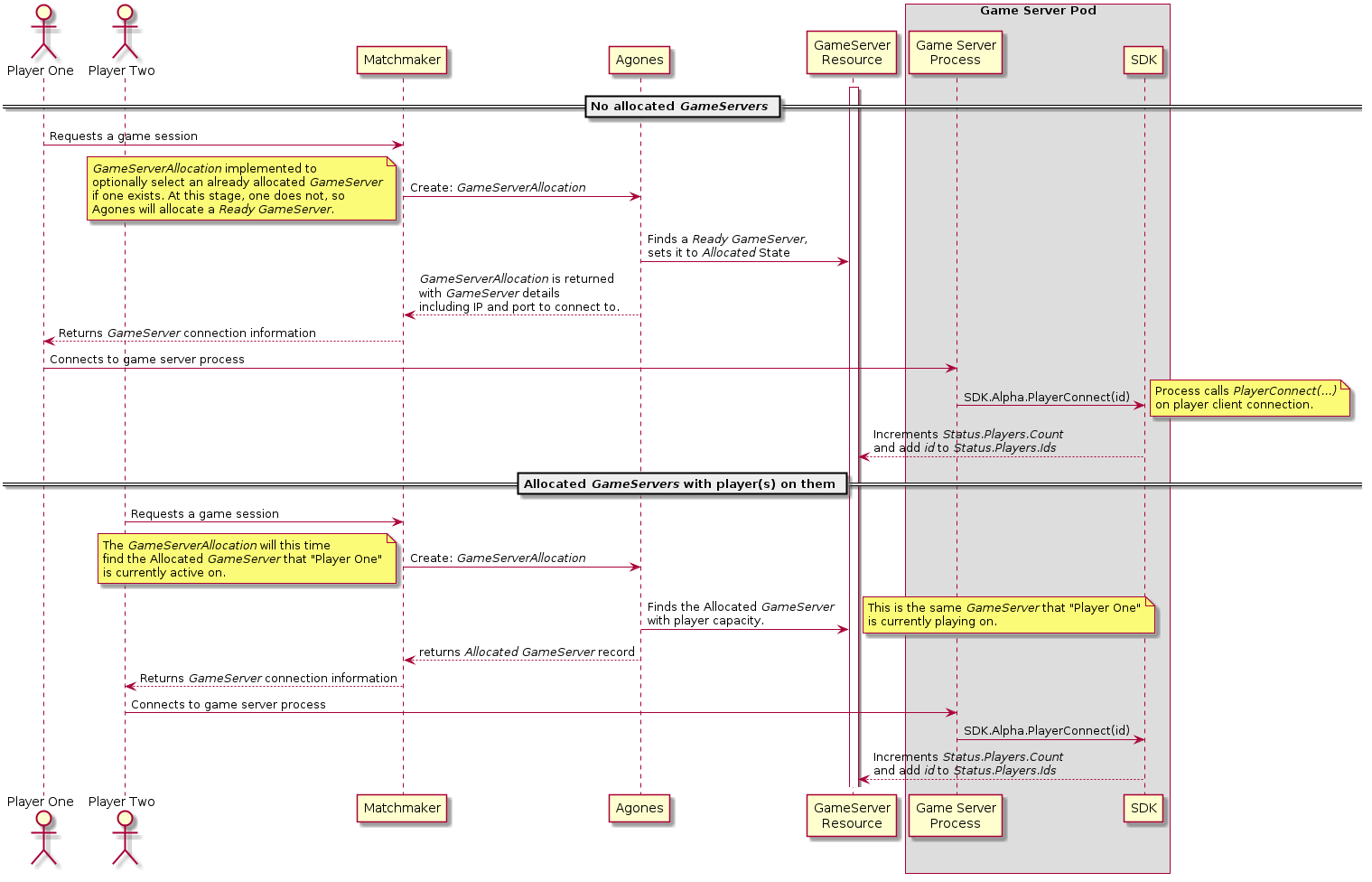
The Player Tracking and Allocation Player Filter features are currently Alpha, not enabled by default, and may change in the future.
Use the FeatureGates PlayerTracking, and PlayerAllocationFilter
to enable and test these features.
See the Feature Gate documentation for details on how to enable features.
 ### Example `GameServerAllocation`
The below allocation will attempt to find an already Allocated `GameServer` from the `Fleet` "lobby" with room for 10
to 15 players, and if it cannot find one, will allocate a Ready one from the same `Fleet`.
```yaml
apiVersion: "allocation.agones.dev/v1"
kind: GameServerAllocation
spec:
selectors:
- matchLabels:
agones.dev/fleet: lobby
gameServerState: Allocated
players:
minAvailable: 10
maxAvailable: 15
- matchLabels:
agones.dev/fleet: lobby
```
## Consistency
Agones, and Kubernetes itself are built as eventually consistent, self-healing systems. To that end, it is worth
noting that there may be minor delays between each of the operations in either of the above flows. For example,
depending on the cluster load, it may take approximately a second for an SDK driven
[list change](/site/docs/guides/client-sdks/#counters-and-lists) on a `GameServer` record to be visible to the Agones
allocation system. We recommend building your integrations with Agones with this in mind.
## Next Steps
- Have a look at all commands the [Client SDK](/site/docs/guides/client-sdks/) provides.
- Check all the options available on [`GameServerAllocation`](/site/docs/reference/gameserverallocation/).
- If you aren't familiar with the term [Pod](https://kubernetes.io/docs/concepts/workloads/pods/pod/), this should
provide a reference.
### Example `GameServerAllocation`
The below allocation will attempt to find an already Allocated `GameServer` from the `Fleet` "lobby" with room for 10
to 15 players, and if it cannot find one, will allocate a Ready one from the same `Fleet`.
```yaml
apiVersion: "allocation.agones.dev/v1"
kind: GameServerAllocation
spec:
selectors:
- matchLabels:
agones.dev/fleet: lobby
gameServerState: Allocated
players:
minAvailable: 10
maxAvailable: 15
- matchLabels:
agones.dev/fleet: lobby
```
## Consistency
Agones, and Kubernetes itself are built as eventually consistent, self-healing systems. To that end, it is worth
noting that there may be minor delays between each of the operations in either of the above flows. For example,
depending on the cluster load, it may take approximately a second for an SDK driven
[list change](/site/docs/guides/client-sdks/#counters-and-lists) on a `GameServer` record to be visible to the Agones
allocation system. We recommend building your integrations with Agones with this in mind.
## Next Steps
- Have a look at all commands the [Client SDK](/site/docs/guides/client-sdks/) provides.
- Check all the options available on [`GameServerAllocation`](/site/docs/reference/gameserverallocation/).
- If you aren't familiar with the term [Pod](https://kubernetes.io/docs/concepts/workloads/pods/pod/), this should
provide a reference.